

How to Log In to Your AW33 Account
The AW33 login modal opens by tapping Login in the top-right of any page. You'll see two authentication tabs — choose whichever suits you best.
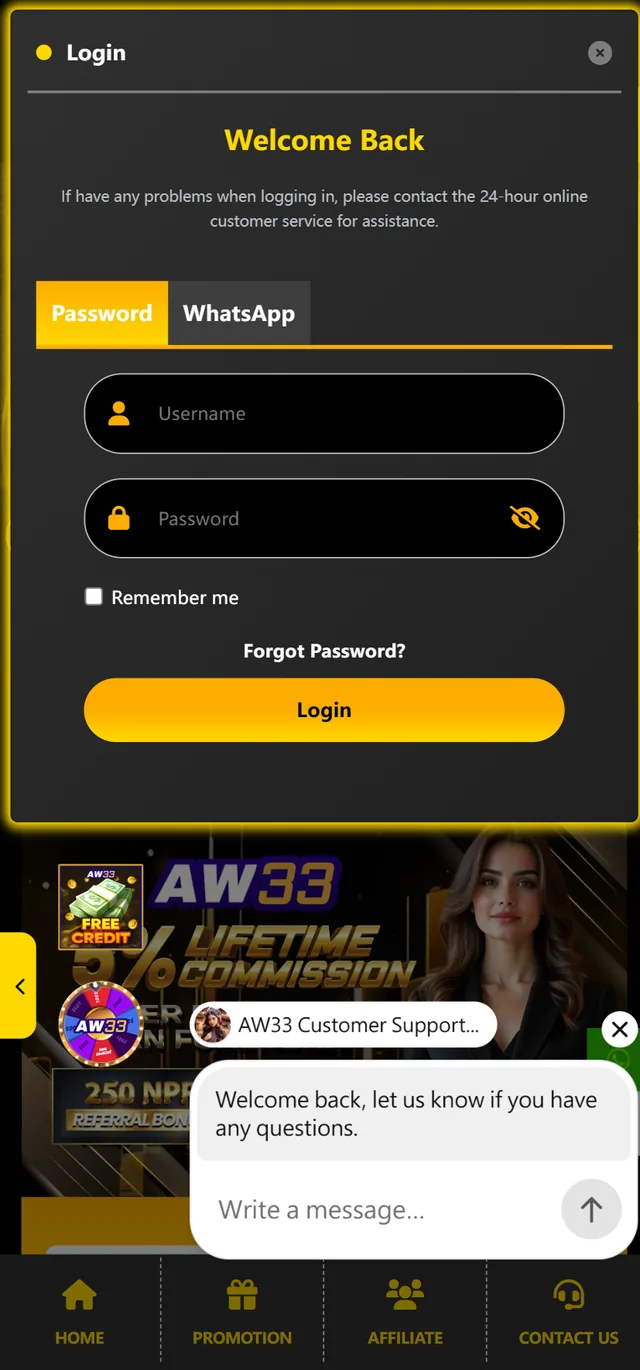
Tab 1: Password Login (recommended)
Enter the username you set during registration and your password, then tap Login. Tap the 👁 eye icon to reveal the password as you type — useful for catching typos on small screens.
The "Remember me" checkbox keeps you signed in on this device for 30 days, so you skip the login step on future visits — convenient for personal phones, but skip it on shared devices.
Tab 2: WhatsApp Login (passwordless)
AW33 is one of the few Nepal gaming platforms offering WhatsApp login — a faster, passwordless alternative ideal for players who prefer not to remember another password.
How WhatsApp login works:
- Switch to the WhatsApp tab on the login modal.
- Enter the WhatsApp number you registered with.
- Tap Send Code — a 6-digit verification code arrives on WhatsApp within seconds.
- Enter the code on the same screen.
- You're logged in.
WhatsApp login is especially useful when you've forgotten your password but still have access to your registered WhatsApp number. The verification code expires after 5 minutes for security.
Biometric login (AW33 app only)
Once you've installed the AW33 APK and completed one regular login, you can enable fingerprint or Face ID from Settings → Security → Biometric Login. After setup, future AW33 login takes a single tap.
Resetting Your AW33 Password — Step by Step
Resetting your AW33 password takes under one minute:
- Tap Forgot Password? on the login form.
- Enter the username or WhatsApp number registered to your AW33 account.
- A 6-digit recovery code arrives on WhatsApp (or SMS, depending on your registration method) within seconds.
- Enter the code on the next screen.
- Set a new password (minimum 8 characters, including at least one number).
For security, the recovery code expires after 10 minutes. If you don't receive it within 30 seconds, request a new code. If your registered WhatsApp number is no longer active, contact our 24-hour support team to verify your identity through alternative documentation.
How to Register a New AW33 Account
Creating an AW33 account is fast and free. The registration modal opens by tapping Register in the top-right of any page. AW33 supports two registration paths — choose whichever matches your preference.
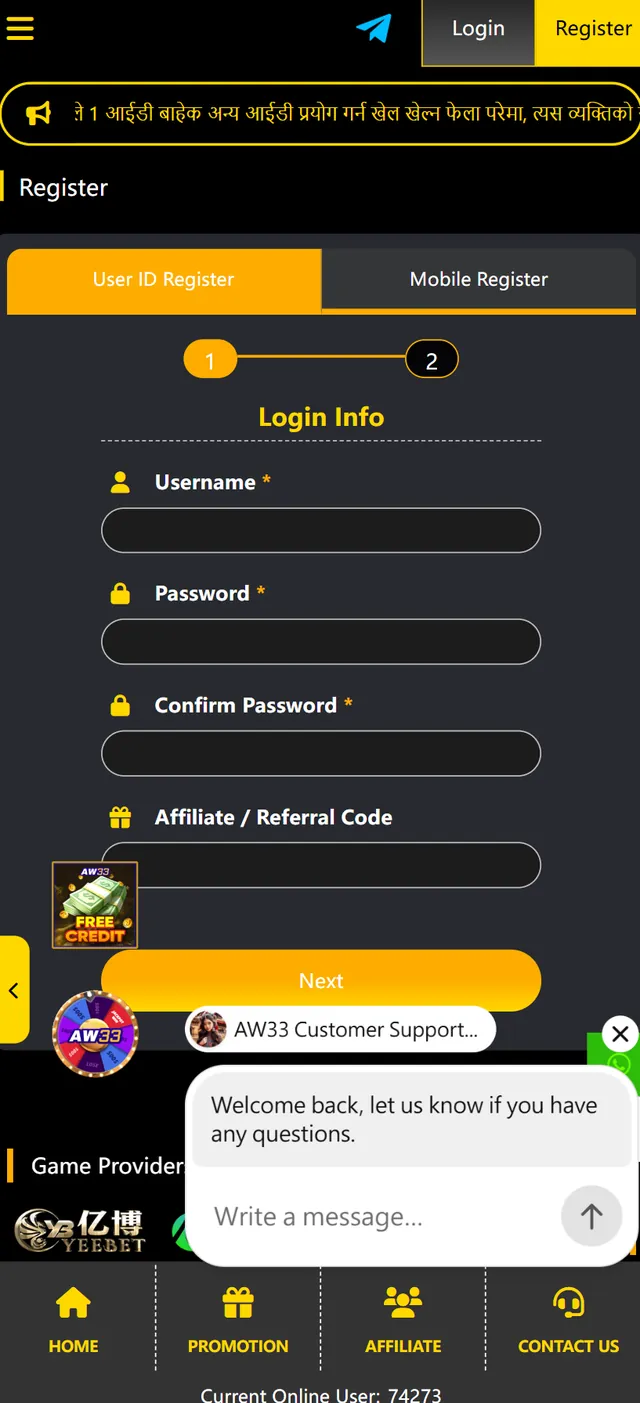
Path 1: User ID Register (recommended for desktop users)
This path lets you choose your own username, ideal if you want a memorable login name. The form is split into two simple steps.
Step 1 — Login Info
- Username — Choose a unique username (4–16 characters, letters and numbers only). This will be your permanent AW33 login identifier. Pick something memorable but not personally identifying.
- Password — Use at least 8 characters with a mix of letters and numbers. Avoid using the same password as your other online accounts.
- Confirm Password — Retype your password exactly. The system blocks the next step if they don't match.
- Affiliate / Referral Code (optional but valuable) — If a friend invited you, enter their code here to unlock instant FREE CREDIT on registration. No code? Visit our AW33 referral code page for the latest active codes.
Tap Next to proceed to Step 2.
Step 2 — Personal & Contact Info
The second step collects your contact details for account verification, secure withdrawals, and support communication. Typical fields include your full name, mobile or WhatsApp number, and preferred currency (NPR by default for Nepal). All information is encrypted with 256-bit SSL and never shared with third parties.
After completing Step 2, your account is active immediately — no email verification delay.
Path 2: Mobile Register (recommended for mobile-first users)
The Mobile Register path uses your phone number as the primary identifier, with an OTP (one-time password) sent via SMS or WhatsApp for verification. This route is faster if you don't want to choose a username, and your mobile number becomes your login credential.
The two steps mirror the User ID flow, but Step 1 collects your mobile number instead of a custom username, with OTP verification before proceeding to Step 2.
Choosing a Strong AW33 Username and Password
A few quick best practices that help keep your account secure:
- Username — Avoid using your full real name, mobile number, or birthdate. A combination of a nickname plus 2–4 numbers (e.g., RajCricket88) is memorable and harder to guess.
- Password — Use at least 10 characters with uppercase, lowercase, numbers, and a symbol. Don't reuse a password from another website — if one site is breached, attackers try the same combination on every gaming and banking platform.
- Save your credentials safely — Use your phone's built-in password manager (Google Password Manager on Android, iCloud Keychain on iOS) rather than writing passwords in a notes app or photo.
- Enable 2FA after registration — Once logged in, go to Account → Security → Two-Factor Authentication and enable SMS or WhatsApp 2FA for an extra layer of protection.
Common AW33 Login Problems — and How to Solve Them
Most AW33 login issues are quick to resolve once you know where to look.
- ❌ "Incorrect password" — but you're sure it's right
- AW33 passwords are case-sensitive. Check that Caps Lock isn't on, and that there's no stray space at the start or end. Tap the 👁 eye icon next to the password field to reveal what you've typed.
- 🔒 "Account temporarily locked"
- After 5 incorrect password attempts, AW33 temporarily locks the account for 15 minutes as protection against brute-force attempts. Wait the cooling-off period and try again — or use the WhatsApp login tab as a faster alternative.
- 📱 Login works on phone but not on desktop
- This is usually a browser cache issue. Clear cookies and cache for aw-33.com, then reload. On the AW33 app, force-stop the app from Settings → Apps → AW33 → Force Stop and reopen.
- 📩 WhatsApp verification code didn't arrive
- Codes typically arrive within 10 seconds. If yours hasn't arrived in 60 seconds, check your WhatsApp app is logged in and connected to the internet. Network congestion in Nepal occasionally delays delivery — switch from mobile data to Wi-Fi if needed.
- ⏱ "Session expired" mid-game
- For security, AW33 sessions automatically expire after 30 minutes of inactivity. Simply log back in to resume play — your bet slips, favourites, and bonus progress are preserved on the server.
- 🔁 Username already taken during registration
- Usernames are unique across AW33. Try adding 2–4 numbers to your preferred name, or use the Mobile Register path instead, which uses your phone number as the identifier.
For any issue not listed, our 24/7 support team is reachable through live chat or Telegram from any AW33 page.
AW33 Login Security — How We Protect Your Account
Every AW33 login is protected by multiple security layers, designed to keep your account safe without making access cumbersome.
- 256-bit SSL encryption secures every credential as it travels between your device and our servers — the same standard used by Nepal's major banks.
- Optional two-factor authentication (2FA) via SMS or WhatsApp adds a second verification step on every login.
- WhatsApp passwordless login removes the password attack surface entirely for players who prefer it.
- Biometric login in the AW33 app stores credentials only on your device.
- Device fingerprinting flags logins from unfamiliar devices and triggers extra verification.
- Login activity log in your account settings shows the date, time, IP, and device of every recent login.
- Automatic session timeout logs you out after 30 minutes of inactivity.
We strongly recommend enabling 2FA for any account with significant balance. Set it up from Account → Security → Two-Factor Authentication after logging in.
AW33 App Login vs Web Login — Which Should You Use?
Both options access the same account with identical balance, transaction history, and bonuses. The differences are in convenience and speed.
The AW33 app offers biometric login, persistent session tokens (so you stay signed in longer), push notifications for promotions and live cricket alerts, and faster load times on Nepal mobile networks. The web version on aw-33.com is ideal for desktop play or if you prefer not to install an APK.
For the fastest mobile login experience, explore the AW33 platform and download the latest AW33 APK — installation takes under two minutes.
Switching Languages on AW33
The language toggle inside the login modal switches between English and Nepali (नेपाली) without affecting your account. Your selection is remembered across future visits via a small preference cookie. The same toggle is available throughout your account dashboard, the cashier, and the game lobbies — so the entire AW33 Nepal experience can be navigated in your preferred language.
Need Help? Contact AW33 Support 24/7
If none of the troubleshooting steps above resolve your issue, our support team is available 24 hours a day, 7 days a week:
- In-app live chat — fastest response, available from any AW33 page (look for the "AW33 Customer Support" chat bubble in the bottom-right corner).
- Telegram support channel — quick text-based assistance, accessible from the Telegram icon in the top header.
- WhatsApp support — message our support team directly from your registered WhatsApp number.
- Email support — for documentation-heavy issues like KYC or account recovery.
Our agents speak both English and Nepali, with average response times of under two minutes during peak hours.